How to Transfer via PayNow at UOB
Send money instantly to a mobile number, NRIC/FIN or VPA with PayNow in the UOB TMRW app — no account number needed.
 Singapore
Agent guide. Use these steps to walk the client through the process — the screenshots show exactly what they’ll see on screen.
PayNow lets the client send money instantly to a mobile number, NRIC/FIN or VPA — no bank account number needed. Transfers go through almost instantly in the UOB TMRW app, up to a cumulative S$200,000 daily limit.
Before you start
- The UOB TMRW app
- The client's login (or Face ID / Touch ID)
- The recipient's PayNow-linked mobile number or NRIC/FIN
💡 Tip: The recipient must be registered with PayNow. PayNow shows the recipient's registered name before you confirm — check it matches. There's no fee, and transfers are near-instant up to S$200,000 a day.
Frequently asked questions
What if the recipient isn't on PayNow?
Ask them to link their mobile number or NRIC/FIN to their bank account, or send via FAST using their account number instead.
- 1
Open PayNow
Log in to UOB TMRW and select "PayNow".
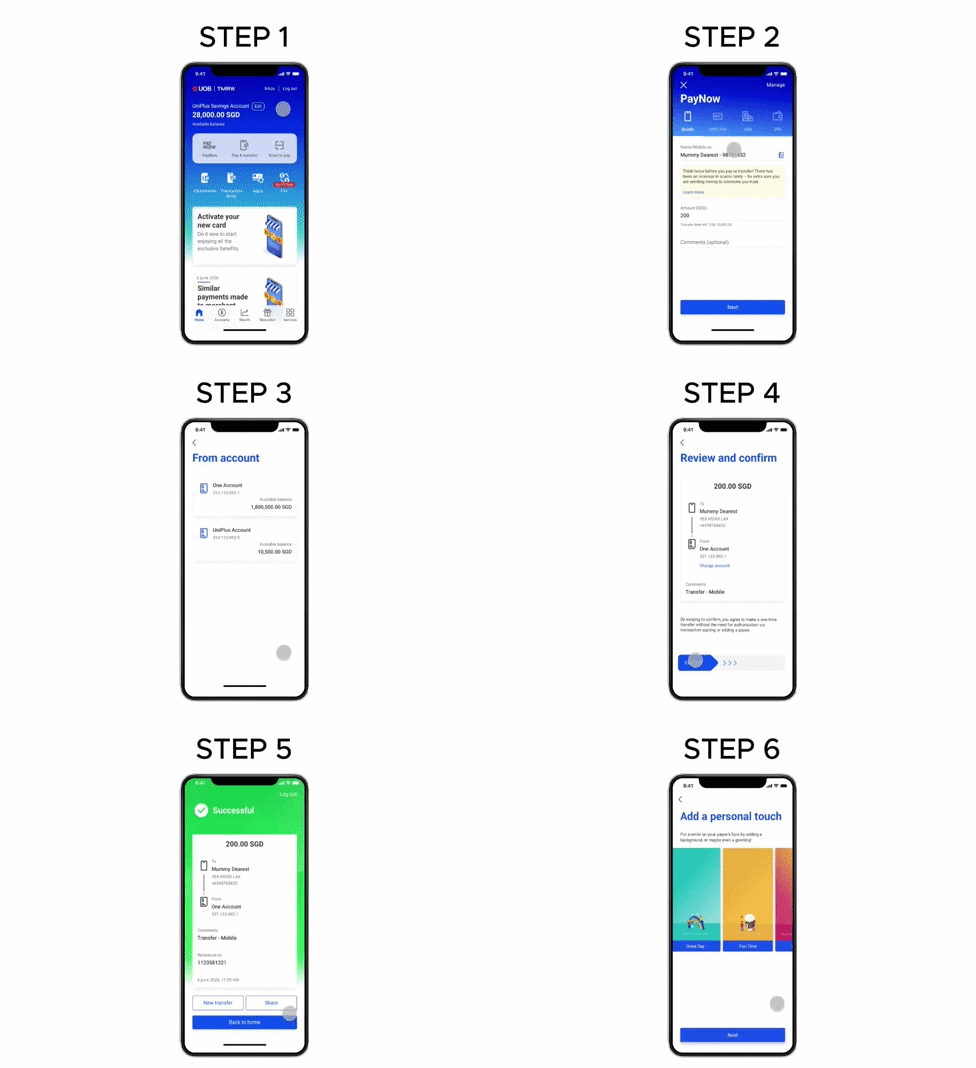
- 2
Enter the recipient
Tap "Mobile" (or NRIC/FIN) and enter the recipient's details.
- 3
Select the debiting account
Select the account to pay from.
- 4
Confirm
Confirm the recipient details by swiping right.
- 5
Done
The transfer is complete.
Reference for assisting clients. Bank screens, steps and limits change often — always confirm the current process with UOB before advising the client.