How to Make a Local Transfer to Another Bank (UOB)
Send SGD to another local bank account in Singapore via FAST in the UOB TMRW app — almost instantly. This is a local (domestic) transfer, not an overseas one.
 Singapore
Agent guide. Use these steps to walk the client through the process — the screenshots show exactly what they’ll see on screen.
This is a LOCAL transfer — sending SGD to another bank account within Singapore, using FAST. It is not an overseas transfer. FAST transfers to participating banks arrive almost instantly. The steps below walk the client through it in the UOB TMRW app.
Before you start
- The UOB TMRW app
- The client's login (or Face ID / Touch ID)
- The recipient's bank and account number
💡 Tip: FAST transfers to participating banks are almost instant, up to S$200,000 a day. To send to a mobile number or NRIC/FIN instead of an account number, use PayNow. Add the recipient as a payee first if you transfer to them regularly.
Frequently asked questions
Is this an overseas transfer?
No — this is a LOCAL transfer within Singapore. Use the overseas transfer flow to send money abroad.
Can I send to a mobile number instead?
Yes — use PayNow to send to a mobile number or NRIC/FIN instead of an account number.
- 1
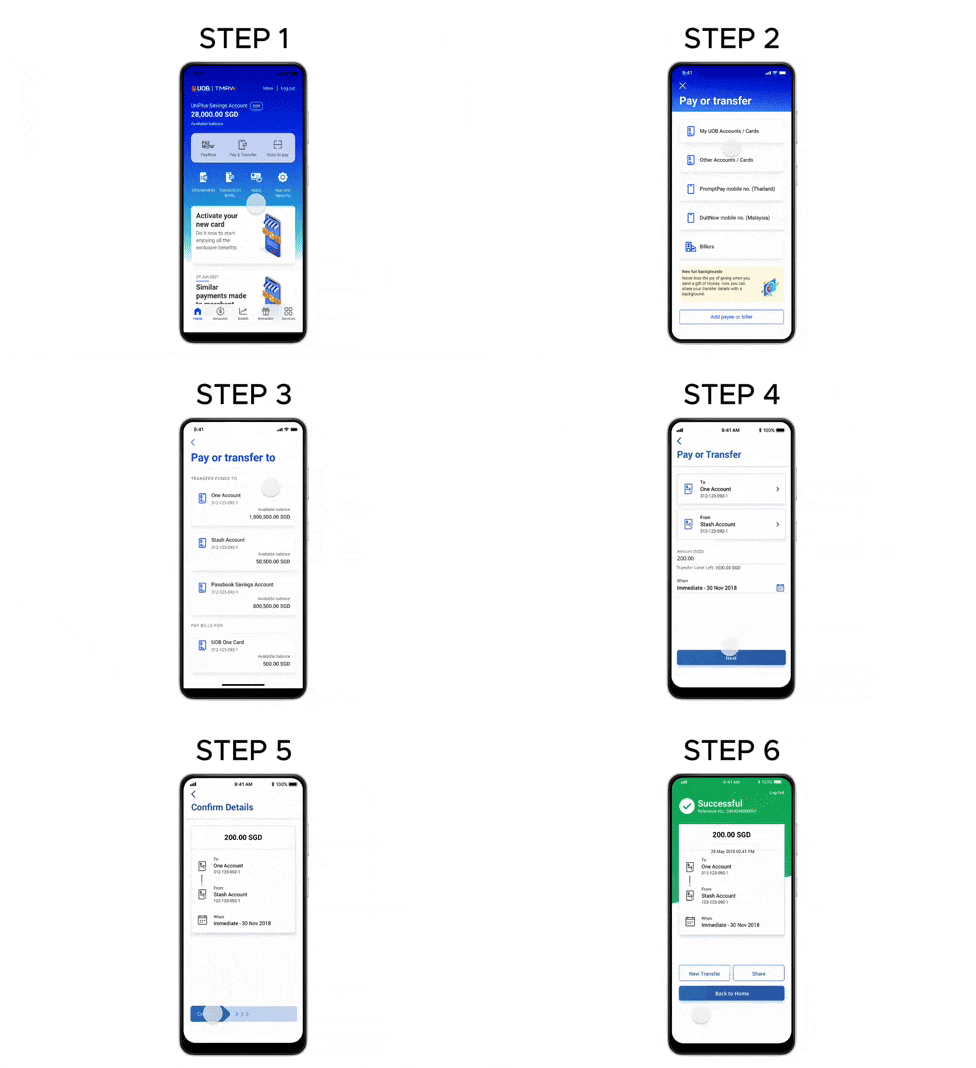
Open Pay & Transfer
Log in to UOB TMRW and tap "Pay & Transfer".
- 2
Choose the recipient
Tap "Other Accounts / Cards" to transfer to another account (or "My Accounts / Cards" for your own).
- 3
Select the bank account
Select the bank account to transfer to.
- 4
Enter the amount and date
The debiting account is pre-selected from your last transaction. Enter the amount and transfer date, and tap "Next".
- 5
Review and confirm
Review the details and swipe right to confirm.
- 6
Done
Your funds transfer is complete — to FAST-participating banks the money arrives almost instantly.
Reference for assisting clients. Bank screens, steps and limits change often — always confirm the current process with UOB before advising the client.