How to Temporarily Increase Your UOB Credit Limit
Request a temporary credit limit increase on your UOB credit card in the UOB TMRW app — for up to 30 days.
 Singapore
Agent guide. Use these steps to walk the client through the process — the screenshots show exactly what they’ll see on screen.
If the client needs more headroom for a big purchase or a trip, they can request a temporary credit limit increase on a UOB credit card in the UOB TMRW app. The earliest start date is 1 day from the request, and the maximum duration is 30 days.
Before you start
- The UOB TMRW app
- The client's login (or Face ID / Touch ID)
- The UOB credit card to increase
💡 Tip: This is a temporary increase (up to 30 days). For a permanent change, use UOB's credit limit review instead.
Frequently asked questions
How long does the increase last?
Up to 30 days, starting from the date you choose (earliest 1 day after the request).
Can I make it permanent?
No — this is temporary. Request a permanent credit limit review separately.
- 1
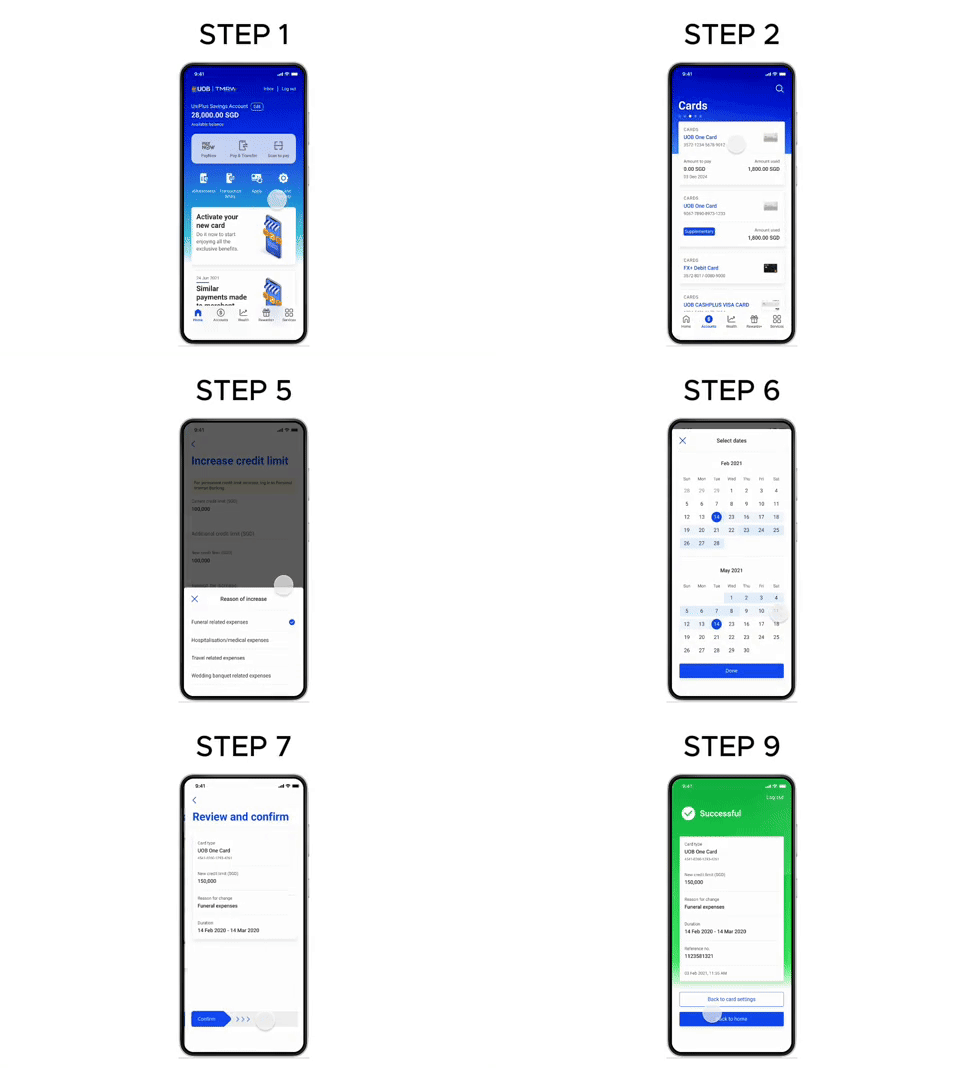
Open Accounts
Log in to UOB TMRW and tap "Accounts".
- 2
Select the credit card
Tap the credit card you want to increase the limit on.
- 3
Open the request
Under Services, tap "Increase credit limit temporarily".
- 4
Enter the amount
Enter the additional credit limit amount.
- 5
Select a reason
Select the reason from the dropdown list.
- 6
Set the duration
Select the duration. The earliest start date is 1 day from the request; the maximum duration is 30 days.
- 7
Continue
Tap "Next".
- 8
Review and confirm
Review the details and swipe to confirm.
- 9
Done
The request is completed.
Reference for assisting clients. Bank screens, steps and limits change often — always confirm the current process with UOB before advising the client.