How to Change Your UOB Transaction Limit
Adjust the transaction (transfer and payment) limits on your account in the UOB TMRW app. A 12-hour cooling period applies to increases.
 Singapore
Agent guide. Use these steps to walk the client through the process — the screenshots show exactly what they’ll see on screen.
Your UOB account has transaction limits that cap how much you can transfer or pay per day. Adjust them yourself in the UOB TMRW app. For security, a 12-hour cooling period applies before a limit increase takes effect; reductions are immediate.
Before you start
- The UOB TMRW app
- Your login (or Face ID / Touch ID)
- Your UOB TMRW digital token (for increases)
💡 Tip: Increases have a 12-hour cooling period as a fraud safeguard; reductions take effect immediately and don't need the digital token.
Frequently asked questions
Why isn't my higher limit active yet?
A 12-hour cooling period applies to limit increases as a fraud-control measure.
Is this my card spending limit?
No — this caps transfers and payments. Card purchases are governed by your credit limit (see the temporary credit limit increase guide).
- 1
Open Transaction limits
Log in to UOB TMRW and tap "Transaction limits".
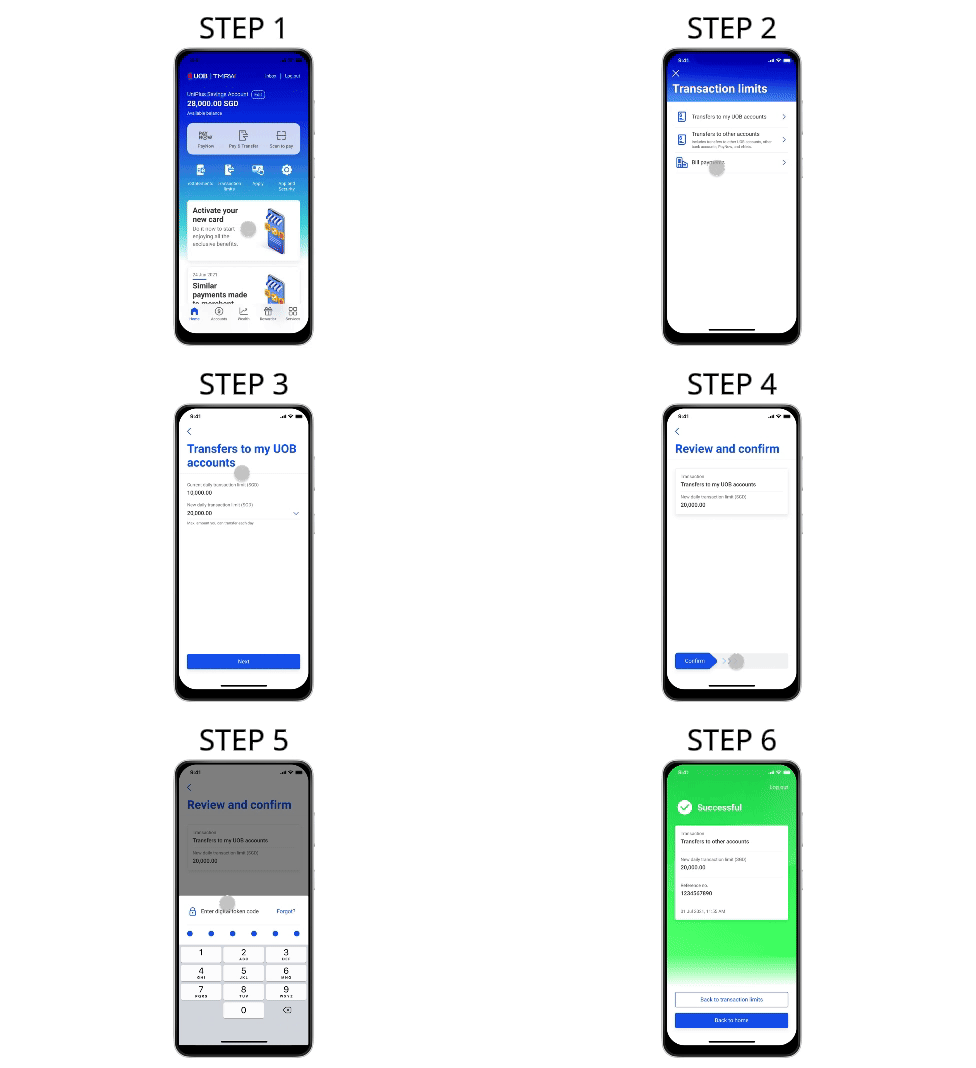
- 2
Select the limit
Select the limit you wish to change.
- 3
See current and new limit
Your current and new limit are shown here.
- 4
Review and confirm
Review your new limit and swipe right to confirm. A 12-hour cooling period applies before an increase takes effect; reductions are immediate.
- 5
Enter your digital token code
Enter your digital token code as an added layer of security (not required for limit reductions).
Reference for assisting clients. Bank screens, steps and limits change often — always confirm the current process with UOB before advising the client.