How to Activate Your New UOB Card
Activate a new UOB debit or credit card in the UOB TMRW app — it can't be used until you activate it yourself.
 Singapore
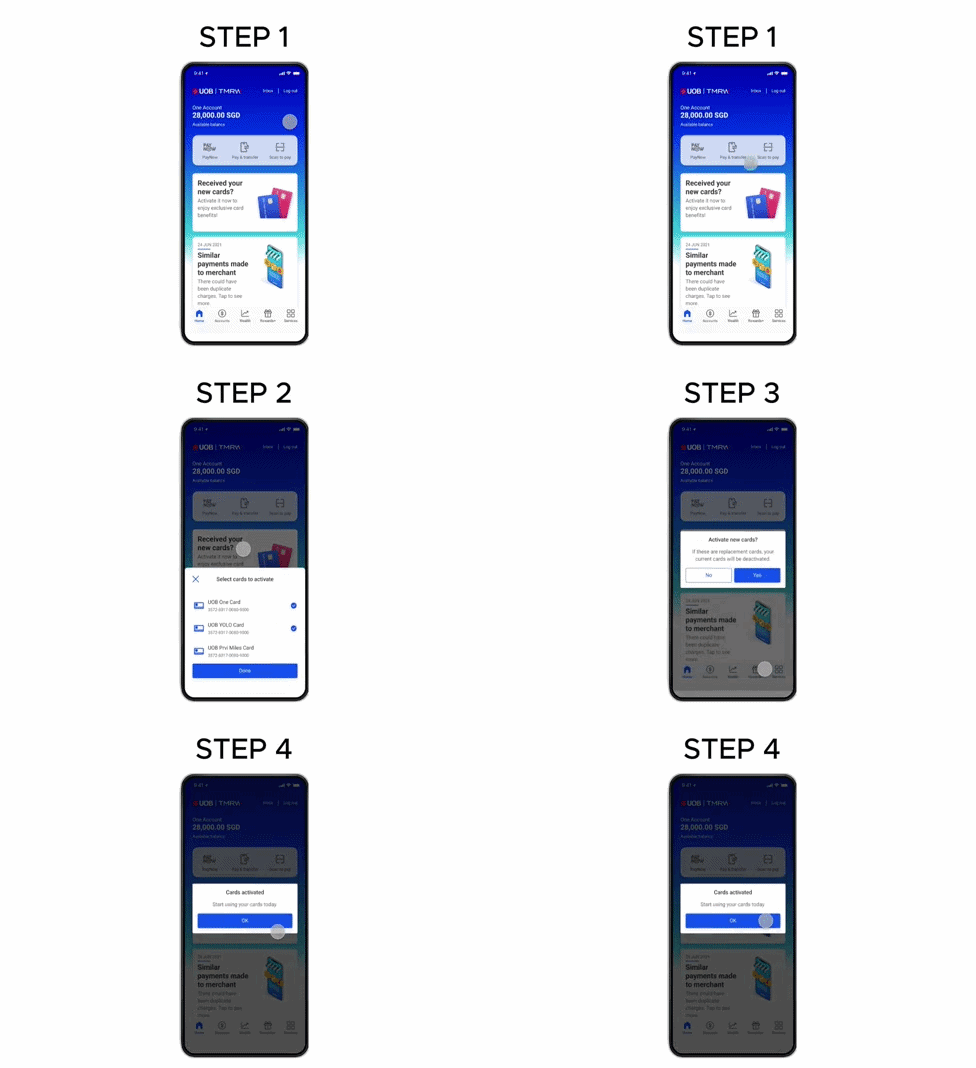
Agent guide. Use these steps to walk the client through the process — the screenshots show exactly what they’ll see on screen.
A new UOB debit or credit card must be activated before it can be used. Activate it in the UOB TMRW app. Activating a replacement card deactivates the current one.
Before you start
- The UOB TMRW app
- The client's login (or Face ID / Touch ID)
- The new UOB card
💡 Tip: Activation takes effect immediately. You may be asked for an SMS OTP to confirm, and to set the card PIN separately.
Frequently asked questions
Why do I need to activate a new card?
A new card can't be used until you activate it — protecting you if it's lost or stolen in transit.
- 1
Open the activation prompt
Log in to UOB TMRW and tap "Received your new cards?".
- 2
Select the cards
Select the card(s) you want to activate.
- 3
Confirm activation
Tap "Yes" to proceed. Activating a replacement card deactivates your current card.
- 4
Done
Tap "OK" — you can start using your new card.
Reference for assisting clients. Bank screens, steps and limits change often — always confirm the current process with UOB before advising the client.